

Axis Robotics Airdrop is a trending ongoing project, but many users are still leaving it aside because it takes time to complete the limited tasks.
In recent months, airdrops have significantly reduced rewards for users, so many people have lost interest in joining new airdrops. About Axis Robotics, it is a Physical AI robotics company collecting data by giving tasks to users. It is a decentralized platform on the Base ecosystem for robot data collection and training.
Currently, they are distributing points for completing tasks, and they have stated that there will be incentives for points holders once they launch the token.
Axis Robotics raised $12 million in a seed round led by Hack VC, with participation from Nomad Capital, Pi Network Ventures, 10K Ventures, and other investors in 2026.
Let’s see how to join and complete the tasks.
Contents of the Page
How to Join the Axis Robotics Airdrop?
Visit the Axis Task Campaign Page.
Enter your email or click on Continue with Google.
Training
Now, get a tour of all the pages by clicking Next, Next, Next, or just click on the cross symbol to jump to the task homepage.
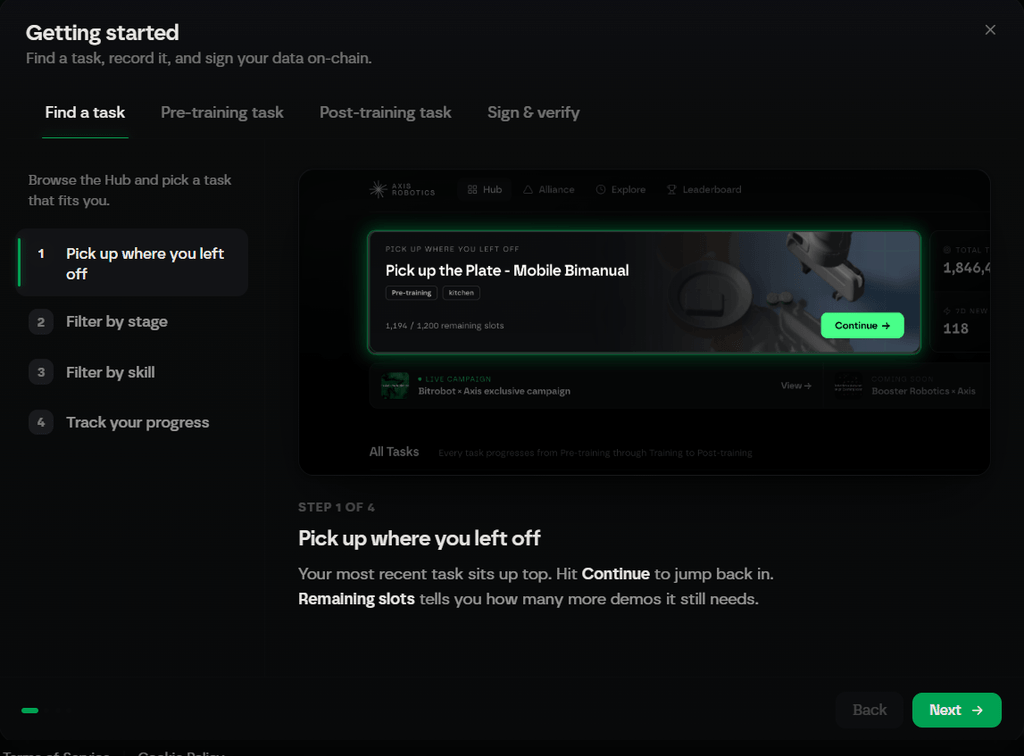
Now you are ready to go.
At first, do some practice to get habituated to the controls. Find the practice task below the statistics on the homepage.
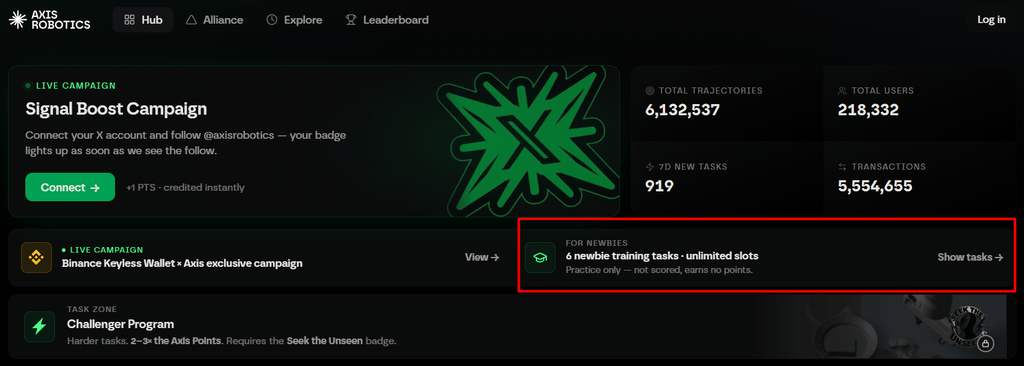
I haven’t tried it on mobile, but on PC, most of the operating keys are the UP, DOWN, RIGHT, LEFT arrow keys, Mouse Left, and E, D, R, N, B, followed by Q, W, A, S, Z, X.
LIVE Tasks
Scroll down a little bit to see all the live tasks available on the Hub.
Take note that new tasks go live every day at 12 PM UTC with limited slots, like 300 or 1,200.
Let’s open the page at the correct time and go to the To Do tab to find live tasks, then click on a task to start.
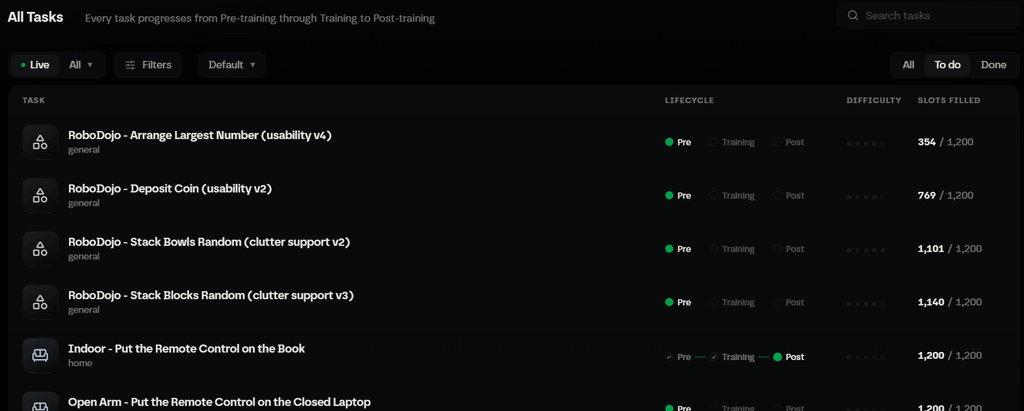
Slots are limited, and you can see how many task slots have already been completed by users. Don’t start a task that has fewer than 10 slots left because by the time you attempt the task, the slots might be filled.
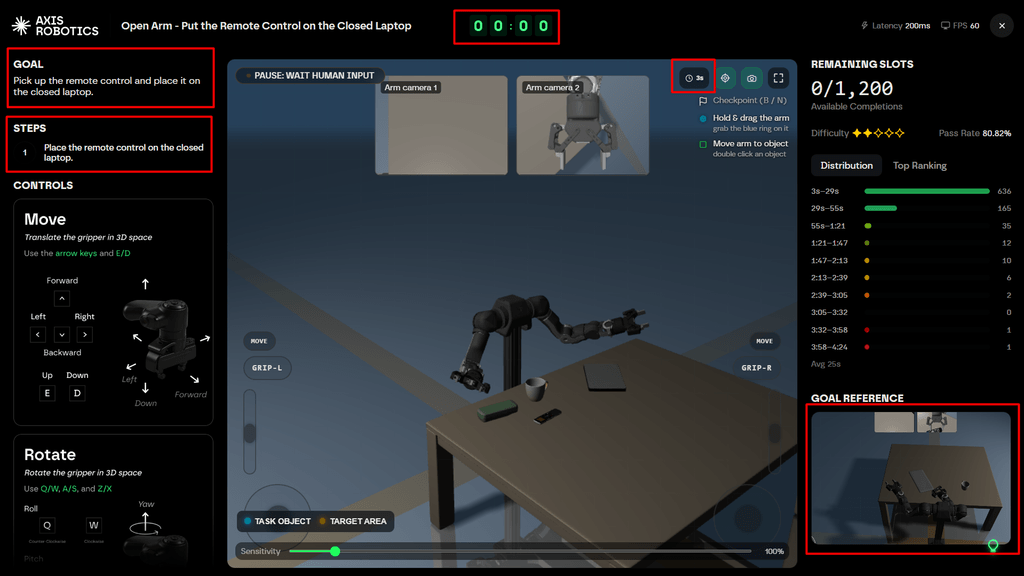
GOAL
On the Live Task page, on the left side, you will see the Goal to be achieved and the step-by-step tasks in order.
Controls
Below the Goal details, you will get all the keys or moves needed for the task, which I already covered above.
If you play with a joystick controller, it might be easier to control the robot arm.
I will explain more about how the controls work during a live task.
Timer
At the middle top of the page, you can see the timer. The less time you take to complete the task, the more score you get.
You can see a 3s icon there. By default, it will be turned off. But you must turn this on during difficult tasks. Your robot arm movement will slow down, but less time will be counted.
Sensitivity
Sensitivity is a supportive feature. Try the sensitivity at 500–700% for Open Arm tasks and 1,000% for Franka tasks.
Goal Reference
At the bottom right corner, you can see the actual finished-task reference screenshot.
How to Perform a Task on Axis Robotics Airdrop?
Let’s complete a live task.
Click on the Expand icon to make the task window full screen. Now you can see the Task Object and the Target Area blinking with cyan and yellow colors.
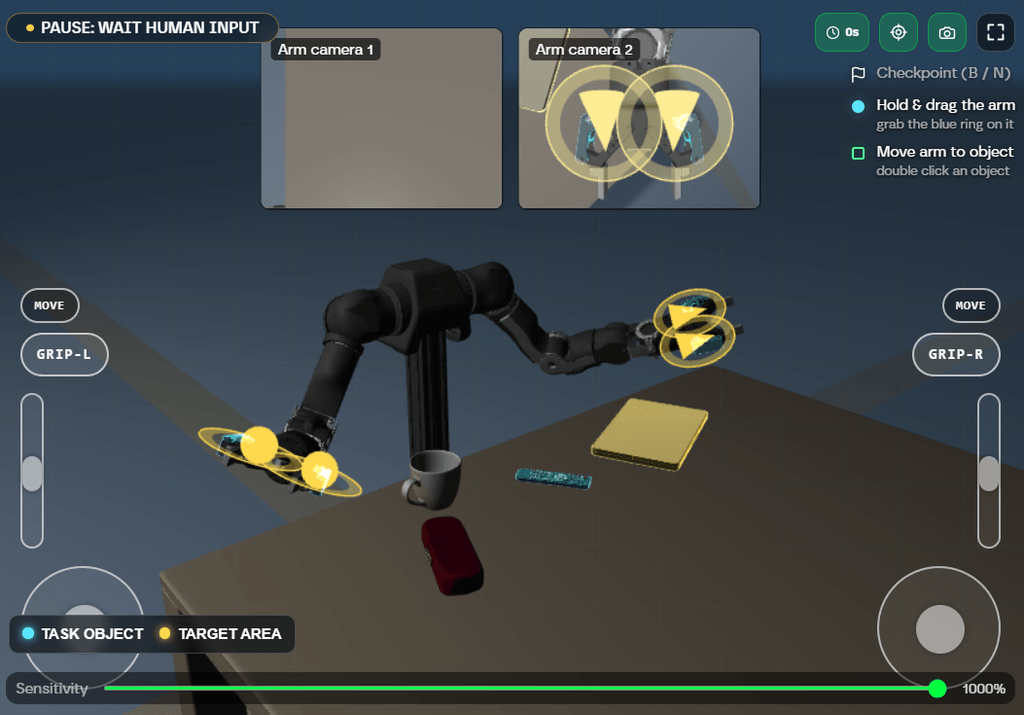
Double-click on the Task Object, and the robot arm will automatically reach near the object. If it doesn’t reach the exact location, then click 2 or 3 times.
Use D on the keyboard to move the arm down and E to move it up. Use Spacebar to grip the object, then move the arm up and double-click on the Target Area so the arm will automatically reach the area.
Then release the object by pressing the Spacebar, and your task will be completed.
After completing a task, click Back and start another task.
When you complete a bunch of tasks, go to your profile and click on your profile. Here, you can see your Embedded Wallet. Copy the wallet address and transfer $1 or more worth of ETH on the Base network from any exchange or your wallet.
You can withdraw the funds anytime if you don’t need them anymore.
After depositing, go to the History tab, where you need to record the completed task on-chain. Click Sign to submit the tasks. Only then will your score be generated.
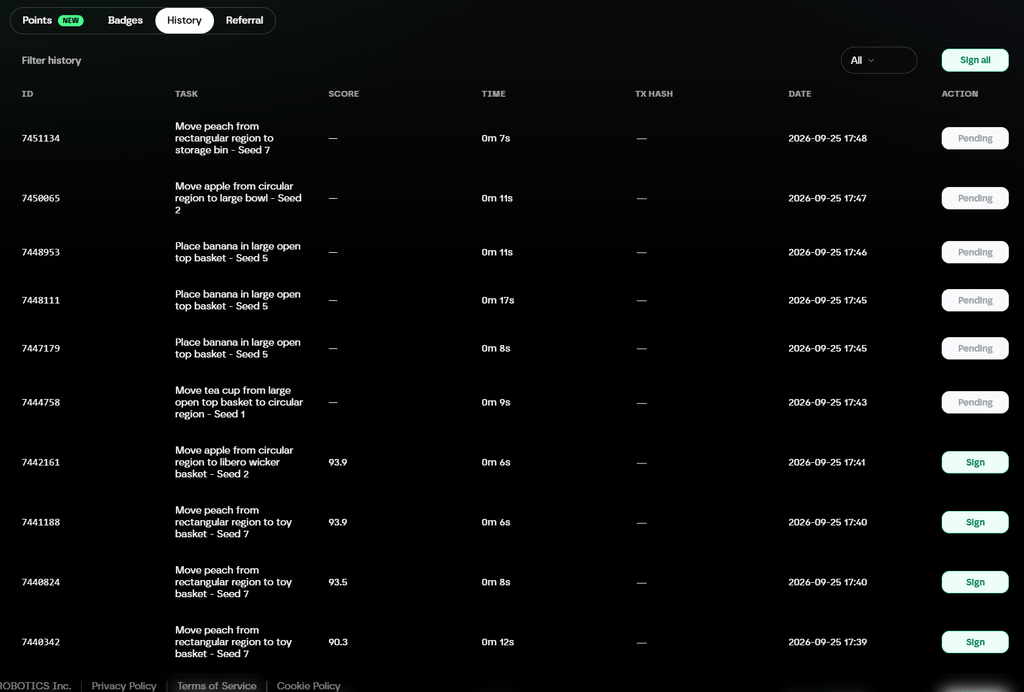
You may see a few tasks are pending. Just wait for a day, and they will be available to sign on-chain.
You can always edit or change your name on your profile. Connect your X profile to the Axis dashboard to get 1 booster point, and if you get any role on Discord, you can also add your Discord here.
Referral
Go to the Referral tab to get your referral link so you can invite your friends too. You will get 10% of your friends’ points earnings.
Points
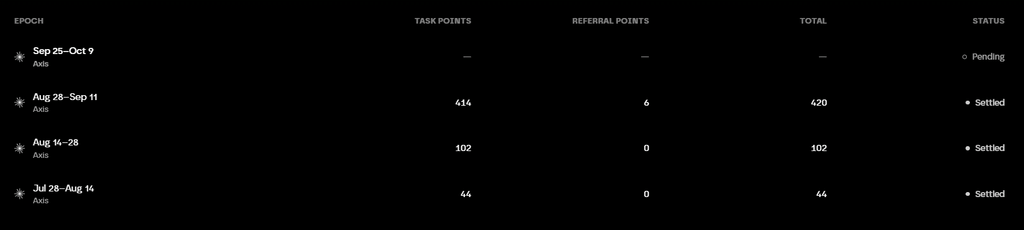
Points are distributed to users every two weeks based on the quality of their work.
Conclusion
Axis Robotics is an interesting project for users who want to explore Physical AI and earn points by completing robot data collection tasks. The tasks can take some time to complete, especially when the available slots are limited, but once you understand the controls, completing them becomes easier.
If you are interested in the Axis Robotics Airdrop, you can start by completing the available live tasks and regularly checking for new tasks. Make sure to submit your completed tasks on-chain and keep an eye on official Axis Robotics announcements for any future updates about the points program and potential rewards.
What is the Axis Robotics Airdrop?
Axis Robotics is a Physical AI robotics project that uses users to help collect data through robot-related tasks. Users can complete available tasks, submit their completed work on-chain, and earn points based on the quality of their work.
How can I complete tasks on Axis Robotics?
After joining the Axis Task Campaign, go to the To Do tab to find available live tasks. Select a task, follow the Goal and Controls shown on the task page, and complete the required steps. After completing tasks, you need to sign the completed tasks on-chain from the History tab for your score to be generated.
How are Axis Robotics points distributed?
Points are distributed to users every two weeks based on the quality of their work.